


In March 2026, HPE, NVIDIA, Kamiwaza and Signal65 published a paper (check here and here) showing about a 20x acceleration for both time-to-first-token (TTFT) and token generation rate, using an HPE Alletra X10000 to store the KV cache. The storage system used S3 over RDMA to achieve this (and is in fact the first NVIDIA-certified object storage system).
The test has, as of the date of this writing, the most complete benchmark disclosure of all the KV Cache competitive tests I could find. It also consists of an extremely hard workload with high concurrency.
I will explain why all this is important, why it’s different from competitor numbers, plus provide some insights about what this means regarding overall system efficiency.
Because the goal isn’t just to keep GPUs busy. It’s to keep them busy generating new stuff, not recalculating old stuff.
The benefits with this solution are numerous:
- Far more workload becomes possible but also…
- One could approach it as a lot less infrastructure is needed due to far more efficient use of the hardware, which means…
- Lower power and rackspace requirements, which all leads to…
- Lower Watt/token and lower $/token.
Wait, what is KV Cache anyway?
Imagine writing a summary of a long book.
Without KV cache: Every time you want to write one new word of your summary, you have to re-read the entire book from page one. Every. Single. Word. It’s exhaustively slow.
With KV cache: You read the book once and take organized notes. Each time you write the next word, you just glance at your notes. You never re-read the book.
In an autoregressive LLM, the KV cache is that notepad. As the model reads your prompt, it saves structured notes about each word so it doesn’t have to reprocess everything from scratch when generating each new word.
- Keys help the model find which earlier words are relevant – think of them as an index.
- Values hold the actual content retrieved from those relevant words.
In AI pipeline terms, this means that the GPUs are kept busy calculating new tokens, not wasting time and energy redoing prefill calculations.
The trade-off: those notes take up memory. Long prompts, long conversations, and many users at once can make the notepad enormous – which is one of the biggest engineering costs in running LLMs at scale.
There are multiple ways to fix this problem – and they’re complementary. Some examples:
- KV Cache extension (what we will be discussing)
- Quantization (cool stuff like Turboquant at 4 bits seems very attractive at the moment)
- Prefix caching to share cache between queries
- Multi Query Attention/Grouped Query Attention
Bottom Line Up Front: The numbers
Here are the token generation rate results:
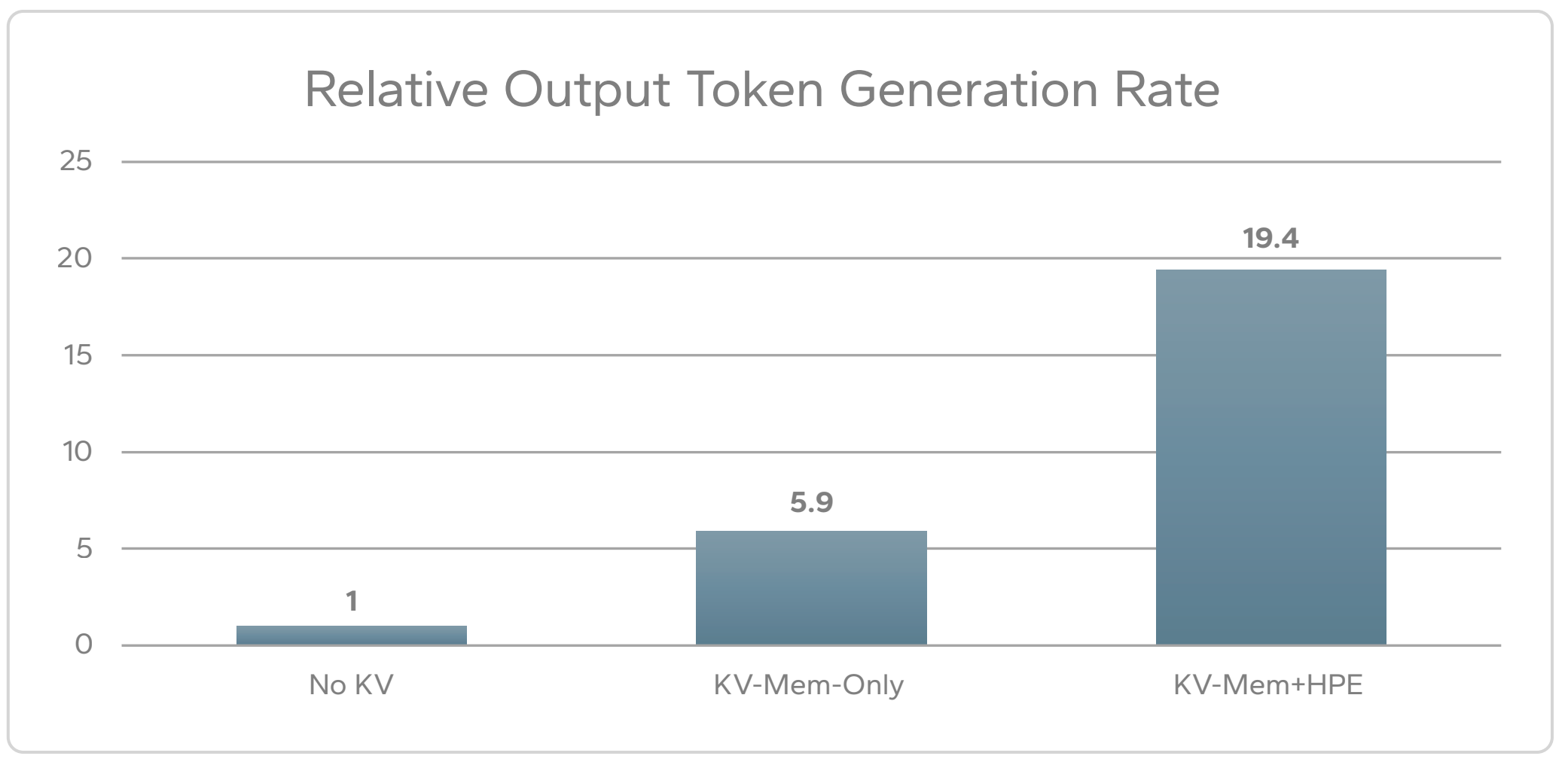
It’s important to note that not just the final result is being shown but also the performance of KV caching using only server memory. Without the external X10000 storage helping, the system gets a respectable 5.9x speedup with memory KV caching.
Together with the X10000, the overall token generation speedup using memory plus the X10000 is about 20x.
I mention that because it’s common to see in marketing materials just the topline number, comparing it to not having KV caching at all but omitting the intermediate number using server memory.
It’s crucially important to know how much the result with external storage improves vs memory-based KV caching – for example, if the server memory alone provided 15x and with the X10000 we got to 20x, that wouldn’t be a very compelling result.
The TTFT results were similarly strong:
- 21.5x improvement using KV Cache (X10000 + memory) vs not having any KV Cache
- 5.6x improvement when adding the X10000 vs memory-only KV Cache
So all in all – a massive improvement.
The test setup
The test is incredibly transparent and provides far more configuration details than any other result I could find from the other storage vendors.
Important to note: the concurrency of requests (96) and the request context size (50,000 tokens). This allows one to calculate the total workload in flight because it’s 96 of these requests running in parallel, not a single request or some unspecified nebulous number.
The other interesting nuance is that the server itself has a lot of memory (1.5TB) and 8x H200 high end GPUs providing another TB of HBM. That’s a lot of memory, more than in any recent competitive benchmark I’ve seen (most seem to use 4x or 8x H100 GPUs).
This means that this super beefy server already provides a huge amount of KV cache boost by itself (as you can see from the results – about 6x speedup just from server memory alone).
The test was multi-turn (results were from turn 3 or later), simulating a typical interaction with an initial question plus followups. It used a real pipeline with both prefill and decode phases.
| Component | Details |
| Server | 1x dual-CPU HPE ProLiant Compute DL380a Gen12, 1.5TB RAM 2 x 100 Gb ConnectX-7 RDMA enhanced DPU |
| GPU | 8x NVIDIA H200 NVL (w/ 140 GB HBM) |
| Storage | HPE Alletra MP X10000, 4 controllers, 24x 3.84TB drives, serving S3 over RDMA |
| OS | Ubuntu 24.04.3 LTS |
| Nvidia Driver | NVIDIA-SMI 590.48.01 CUDA Version: 13.1 |
| LLM | NVIDIA Nemotron 70B |
| Inference Framework | vLLM + LMCache |
| KV Cache Backend | Kamiwaza custom LMCache backend (HPE Object SDK) |
| Max Model Length | 61,000 tokens |
| Concurrent Requests | 96 |
| Request Context Size | 50,000 tokens |
How to do a comparison with other vendor published results
I won’t list the other results here since more keep coming but numbers showing 10-20x speedups (or more) are becoming fairly common. What I want to do instead is show you how to ask for more detail which can help you then decide which results are stronger and more realistic:
- Show the results from a complete end to end pipeline, not just prefill numbers
- Show concurrency
- Show the request context size
- Use a realistic multi-turn test, not a single query with prepopulated cache
- Show the additional benefit vs memory-based KV Cache, not just the final topline number including memory + external storage KV Cache
- Show server memory size (DRAM + HBM)
- Show details of the storage hardware used to achieve the result (number and type of controllers, number of drives at a minimum)
So for example – showing a 20x speedup for a large context size for a single prefill operation isn’t the same total workload as a complete pipeline operating with concurrent users.
Why RDMA?
Efficiency. RDMA dramatically reduces server CPU load and improves overall performance, which is why we have things like GPUDirect. Initially this was available for NFS, but now one can do RDMA for object storage with the right platform like the X10000 (as of this writing, most other vendors have this as aspirational or roadmap, not GA – but it’s where the market is headed).
Why use S3 for KV Cache and other parts of the AI pipeline?
Much of AI data already consists of sprawling numbers of items. With no particular structure but need of rich metadata.
With massively parallel readers and writers.
Object semantics are ideal for that use case.
- No need to worry about item count or directory structures – scaling is built-in
- Easiest for shared, multi-client, sharded KV state
- Designed for massively parallel access – doesn’t collapse under huge fan-out
- No file locking concerns
- Built-in multipart parallelism for writes
- Ranged GETs for reads, allowing massively parallel access for different clients reading different parts of the same object
All this aligns with how AI frameworks already work:
- Checkpoint shards
- KV cache segments
- Tensor blocks
- Layer‑wise artifacts
These are already independent byte‑ranges, multipart simply exposes that structure to storage.
S3/RDMA – the best of both worlds
In the past, S3 wasn’t heavily used for KV caching because it lacked RDMA.
With a solution that combines S3 with RDMA, the benefits are the combination of S3 convenience and scale, with RDMA performance and efficiency:
- No special driver needed per client
- No kernel dependencies or tuning
- No POSIX constructs that create contention (lock semantics, cache coherency, inode metadata storms)
- Apps simply need to use RDMA S3 client libraries (for example, NVIDIA provides them) plus the vendor SDK
- Automatic fall-back to non-RDMA operation instead of failure
This is a more sustainable and less error-prone model at scale, which is why all major vendors are heading that way.
Things to remember
If you’re considering running an LLM in a cost-effective way, you most certainly will need some form of external KV caching to get the most out of the hardware and keep it busy doing useful work instead of wasting time redoing old work.
The most efficient transport will be RDMA. A system that can do RDMA for S3 may be the cleanest way to get the maximum benefit, especially at scale.
Last but not least: When comparing vendor performance in KV caching, ensure they are providing enough detail in the disclosure to allow you to make a meaningful comparison.
D
I really like the image you used here.
I’m afraid all this focus on LLM stuff has left me in the dust. I no longer get anywhere close to touching the high-performance equipment involved. You’ve caused me to go read up on S3/RDMA but at this point I’m just an interested observer.
Thanks.